Manage Your Devices from Any Browser

Remote console, serial log search, AI analysis, and alerting — all from a single dashboard.

How the Connection Works

1

SFP Connects Outbound

ConX-SFP establishes an outbound TLS 1.3 WebSocket to the portal. Looks like HTTPS — works through any firewall, NAT, or CGNAT. No inbound rules needed.

2

Portal Manages Everything

Devices auto-register and appear on your dashboard. Assign them to groups, set permissions, configure alerts.

3

You Connect from Any Browser

Open a terminal session, search logs, set up alerts — from anywhere. No VPN, no SSH client, no special software.

Browser-Based Remote Console

Full terminal access to any serial port from your browser.

Two-port access Connect to Port 1, Port 2, or the device CLI independently.
Real-time terminal xterm.js-powered terminal with full keyboard support and session status.
Session recording Every keystroke logged for compliance and troubleshooting.
Multi-user sessions Multiple engineers can monitor the same port simultaneously.

Serial Log Search & Live Tail

Every console message captured, timestamped, and searchable.
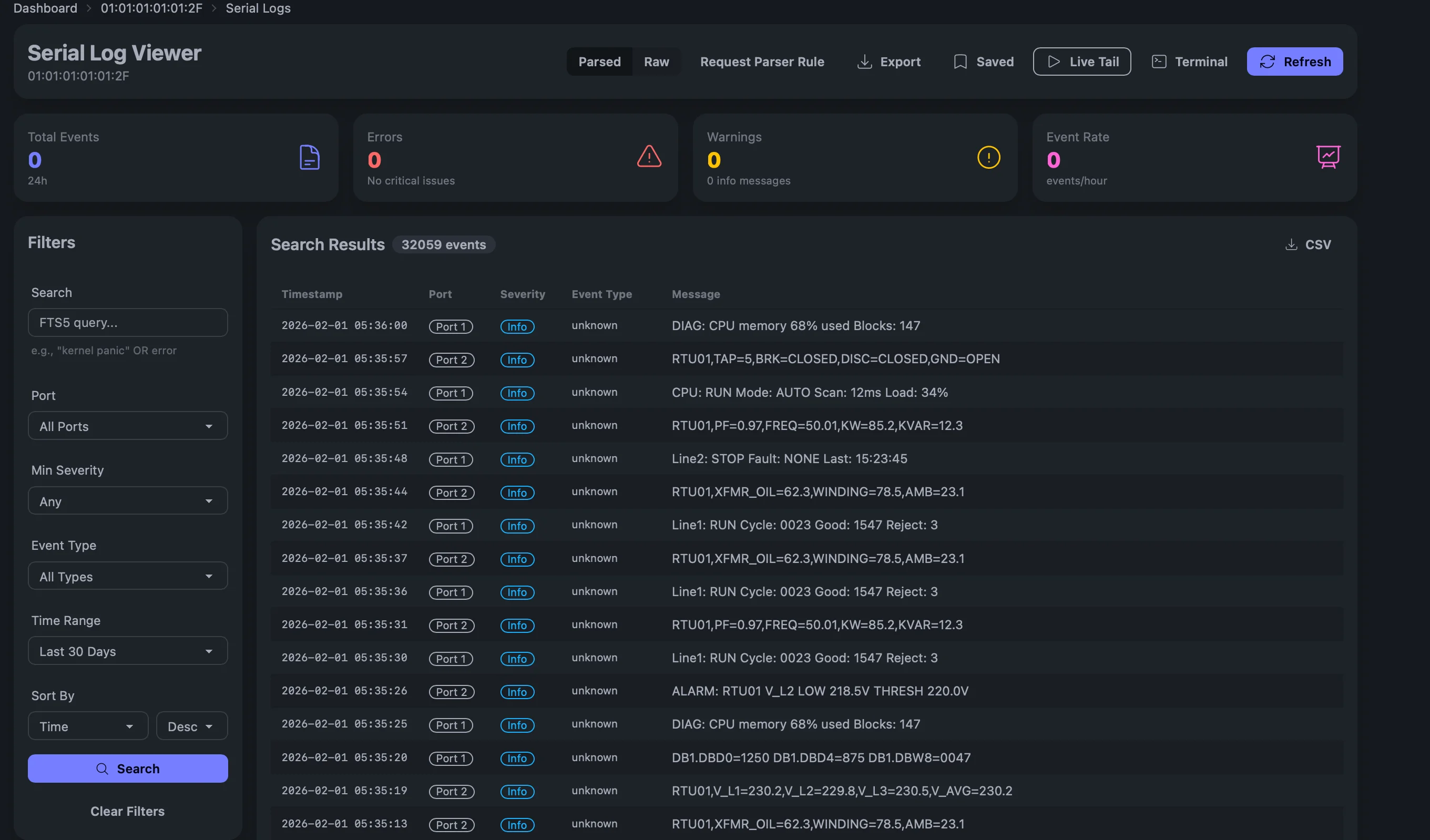
ConX Portal serial log viewer with full-text search, filters, and parsed event display
Full-text search Search across all devices, ports, and time ranges.
Live tail Stream console output in real-time with WebSocket updates.
Saved queries Save and share frequently used search filters.
Export Export logs as CSV or raw text for offline analysis.
Parsed and raw views Toggle between AI-parsed events and raw console output.

Device Management & Access Control

Organize devices into groups, control access, manage at scale.
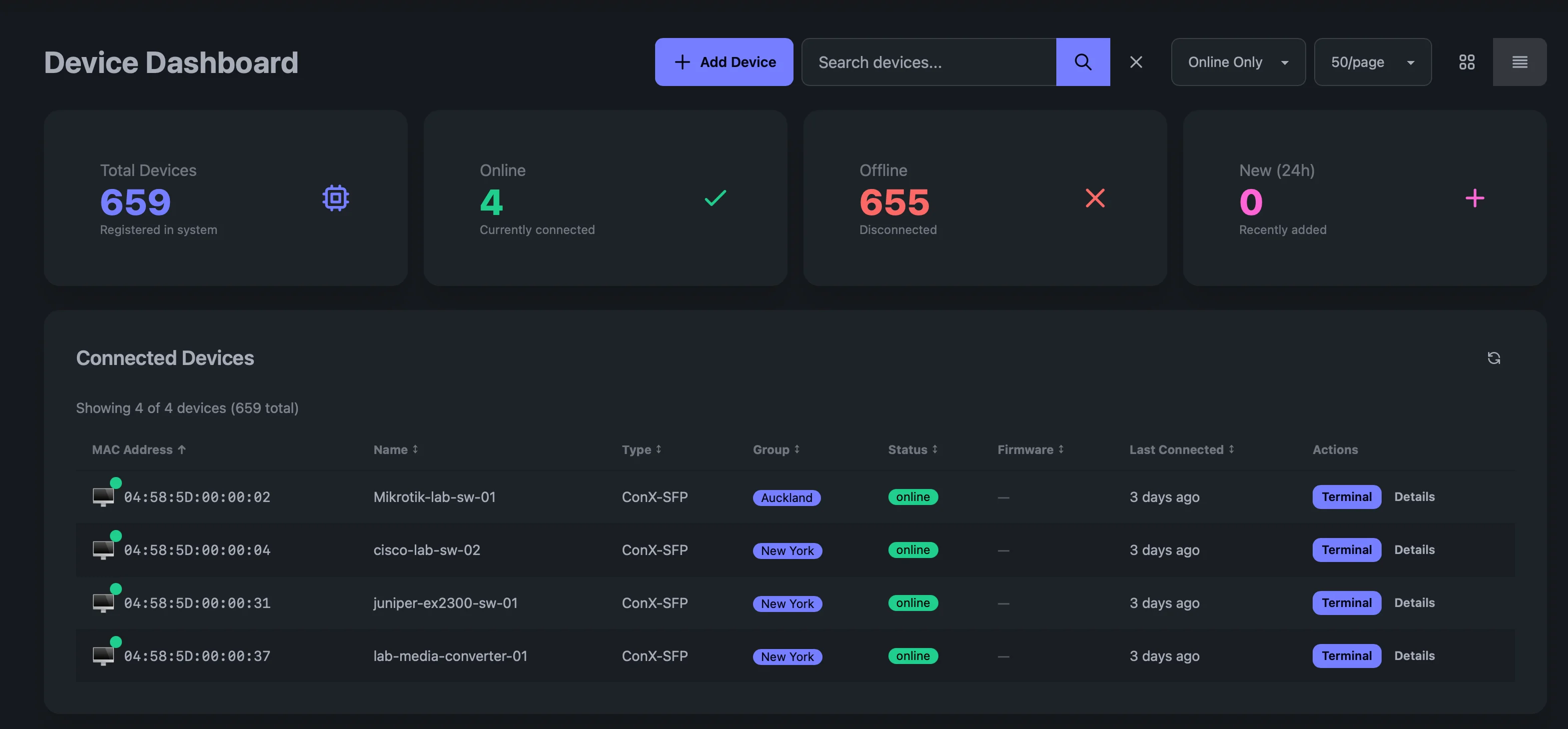
ConX Portal dashboard with device inventory showing online/offline status
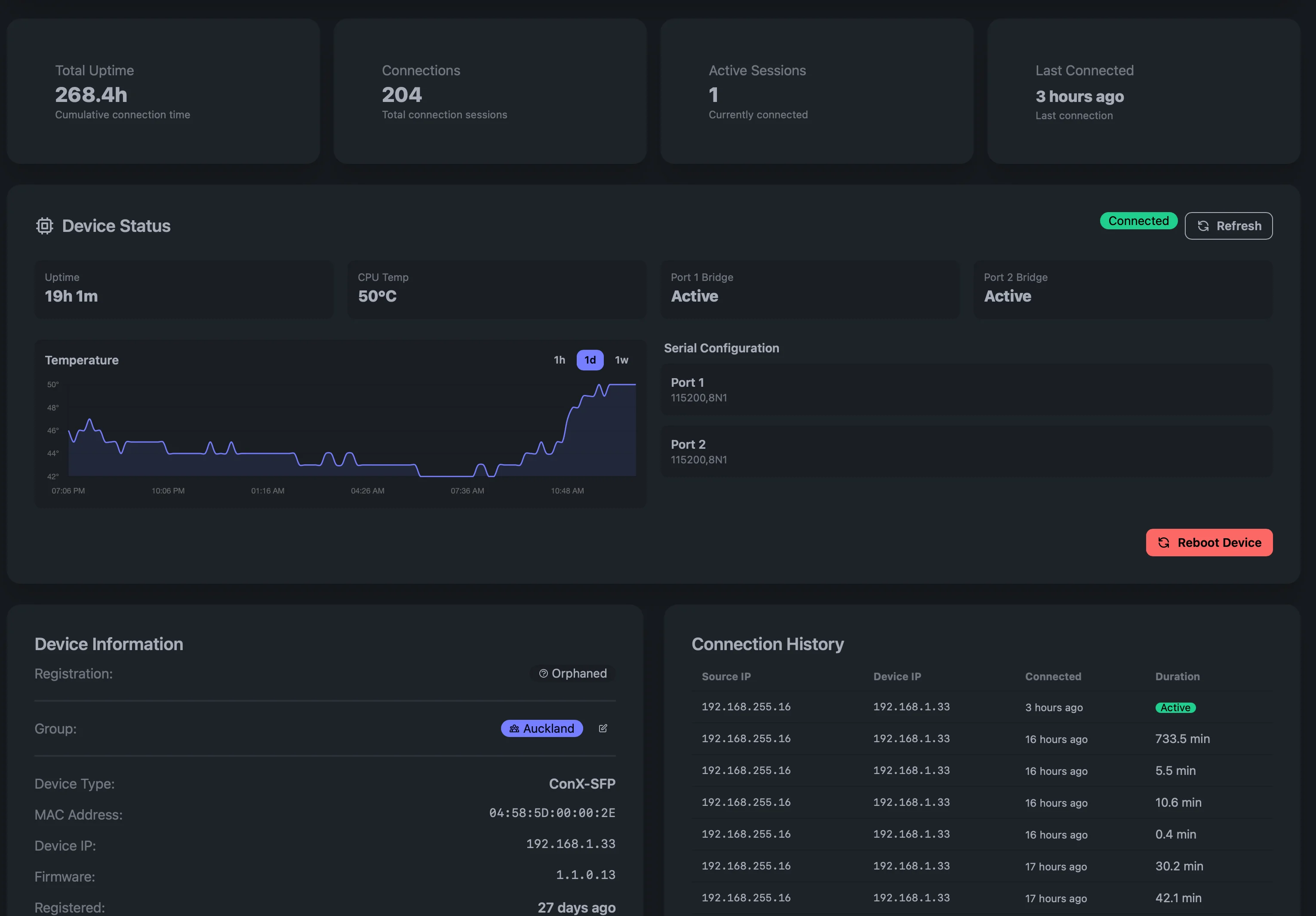
ConX Portal device detail view showing status, temperature, and connection history
Device dashboard Card or table view with real-time online/offline status.
Groups & hierarchy Organize devices by site, customer, or function with nested groups.
Role-based access Per-user permissions — viewer, operator, admin — scoped to groups.
Device claiming Simple 3-step verification to onboard new devices securely.
Tagging & metadata Tag devices with custom labels for filtering and organization.

Alerting, Webhooks & Automation

Get notified when it matters. Automate responses.

Custom alert rules Trigger alerts on device offline, console patterns, or custom conditions.
Webhook delivery HMAC-signed webhooks to Slack, PagerDuty, ServiceNow, or any endpoint.
Scheduled actions Automate recurring tasks like health checks or config backups.
Notification center In-app notifications with read tracking and history.

AI-Powered Console Analysis

Turn console noise into actionable intelligence.

Automated event parsing LLMs parse console output, classify severity, and extract structured events.
Actionable recommendations AI generates next-step recommendations for each event.
Vendor TAC integration Auto-create support tickets with diagnostic context.
Trend analysis Spot patterns across all your devices over time.

Security & Compliance

Enterprise security built in from day one.

TLS 1.3 with mTLS Device authentication via Ed25519 client certificates.
Full audit trail Every login, session, and action logged with timestamps.
SSO / OIDC Integrate with your identity provider for single sign-on.
API keys Scoped API keys for automation and CI/CD integration.
Tenant isolation Complete data separation between organizations.

Deployment Options

Cloud (SaaS)

Hosted and managed by Wetatronics. Zero infrastructure to manage.

  • Isolated tenant architecture
  • Automatic updates and scaling
  • 99.9% uptime SLA
  • Global edge presence

On-Premises

Deploy on your own infrastructure for air-gapped or sovereign environments.

  • Same features, fully self-contained
  • Docker-based deployment
  • No internet dependency
  • Full data sovereignty

Who Uses ConX Portal?

NOC Teams

Monitor distributed networks from a single dashboard with real-time alerts.

MSPs & Resellers

Manage console access across multiple customer environments with tenant isolation.

Security & Compliance

Full audit trails, RBAC, and SSO for regulated industries.

Industrial Operations

Bridge legacy RS-232 equipment to modern cloud management.

Frequently Asked Questions

How does the remote console connection work?
ConX-SFP establishes an outbound TLS 1.3 WebSocket to the ConX Portal — it looks like regular HTTPS traffic and works through any firewall, NAT, or CGNAT. You then open a browser-based terminal session through the portal. No VPN, no inbound firewall rules, no SSH client required.
What can I see in the ConX Portal dashboard?
The dashboard shows all your devices with real-time online/offline status, serial console logs, alert history, activity feed, and detailed device information including uptime, CPU temperature, serial configuration, firmware version, and connection history. Devices can be organized into groups by site, customer, or function.
Can I search serial logs across all devices?
Yes. ConX Portal provides full-text search across all devices, ports, and time ranges. You can save and share queries, stream live console output with the live tail feature, and export logs as CSV or raw text.
Does the portal support webhooks and alerting?
Yes. You can create custom alert rules — for example, trigger when a device goes offline or when a specific pattern appears in console output. Alerts are delivered via HMAC-SHA256 signed webhooks to Slack, PagerDuty, ServiceNow, or any HTTP endpoint. Cooldown periods prevent alert fatigue.
How do I onboard devices to the portal?
Use the 3-step device claiming process: start a claim in the portal, enter the verification code on the device, and confirm. Once claimed, the device auto-registers whenever it powers on and connects to the network.
Is there an API for automation?
Yes. ConX Portal provides a REST API with scoped API keys for automation and CI/CD integration. You can also use webhooks for event-driven workflows and scheduled actions for recurring tasks like health checks or config backups.

Ready to manage your devices remotely?

Contact us for ConX Portal access, or get started with the ConX-SFP hardware.